

Introduction:
Install Apache Tomcat using Ansible is one of the most common automation tasks performed by DevOps engineers. Ansible simplifies server management by automating software installation, configuration, and service management.
Objective:
Learn how to Install Apache Tomcat using Ansible on Ubuntu servers with this complete step-by-step guide. Automate Tomcat installation, configuration, and service management using Ansible.
The objective of this project is to install Apache Tomcat using Ansible and automate the complete setup process on Ubuntu servers.
Prerequisites:
Before you Install Apache Tomcat using Ansible, ensure that the following requirements are :
- Ubuntu 22.04 Server
- Ansible Installed
- Sudo Privileges
- Internet Connectivity
- SSH Access to Target Server
Project Structure
ansible-tomcat/
├── hosts
├── tomcat-install.yml
└── templates
    └── tomcat.service.j2
Steps to Install Apache Tomcat using Ansible
Step 1: Create Inventory File
To install Apache Tomcat using Ansible, first create an inventory file named hosts.
Create hosts file:
[tomcat]
localhost ansible_connection=local
Step 2: Create Tomcat Service Template
This template helps Ansible configure and manage the Tomcat service automatically after installation. When you install Apache Tomcat using Ansible, using a systemd service file ensures that Tomcat starts automatically after system reboots and can be managed using standard Linux service commands.
Create templates/tomcat.service.j2
[Unit]
Description=Apache Tomcat
After=network.target

[Service]
Type=forking

User=tomcat
Group=tomcat

Environment=JAVA_HOME=/usr/lib/jvm/java-17-openjdk-amd64
Environment=CATALINA_PID=/opt/tomcat/temp/tomcat.pid
Environment=CATALINA_HOME=/opt/tomcat
Environment=CATALINA_BASE=/opt/tomcat

ExecStart=/opt/tomcat/bin/startup.sh
ExecStop=/opt/tomcat/bin/shutdown.sh

Restart=always

[Install]
WantedBy=multi-user.target
Step 3: Create Ansible Playbook
The playbook automates all tasks required to Install Apache Tomcat using Ansible, including package installation, service creation, and configuration management.
Create tomcat-install.yml
---
- name: Install and Configure Tomcat
  hosts: tomcat
  become: yes

  vars:
    tomcat_version: "10.1.42"

  tasks:

    - name: Update apt cache
      apt:
        update_cache: yes

    - name: Install Java
      apt:
        name: openjdk-17-jdk
        state: present

    - name: Create Tomcat Group
      group:
        name: tomcat
        state: present

    - name: Create Tomcat User
      user:
        name: tomcat
        group: tomcat
        home: /opt/tomcat
        shell: /bin/false
        system: yes

    - name: Create Tomcat Directory
      file:
        path: /opt/tomcat
        state: directory

    - name: Download Tomcat
      get_url:
        url: "https://downloads.apache.org/tomcat/tomcat-10/v{{ tomcat_version }}/bin/apache-tomcat-{{ tomcat_version }}.tar.gz"
        dest: "/tmp/apache-tomcat-{{ tomcat_version }}.tar.gz"

    - name: Extract Tomcat
      unarchive:
        src: "/tmp/apache-tomcat-{{ tomcat_version }}.tar.gz"
        dest: /opt/tomcat
        remote_src: yes
        extra_opts:
          - --strip-components=1

    - name: Set Ownership
      file:
        path: /opt/tomcat
        owner: tomcat
        group: tomcat
        recurse: yes

    - name: Make Scripts Executable
      shell: chmod +x /opt/tomcat/bin/*.sh

    - name: Deploy Tomcat Service File
      template:
        src: tomcat.service.j2
        dest: /etc/systemd/system/tomcat.service

    - name: Reload Systemd
      systemd:
        daemon_reload: yes

    - name: Start and Enable Tomcat
      systemd:
        name: tomcat
        state: started
        enabled: yes

    - name: Open Port 8082
      ufw:
        rule: allow
        port: "8082"
        proto: tcp
      ignore_errors: yes
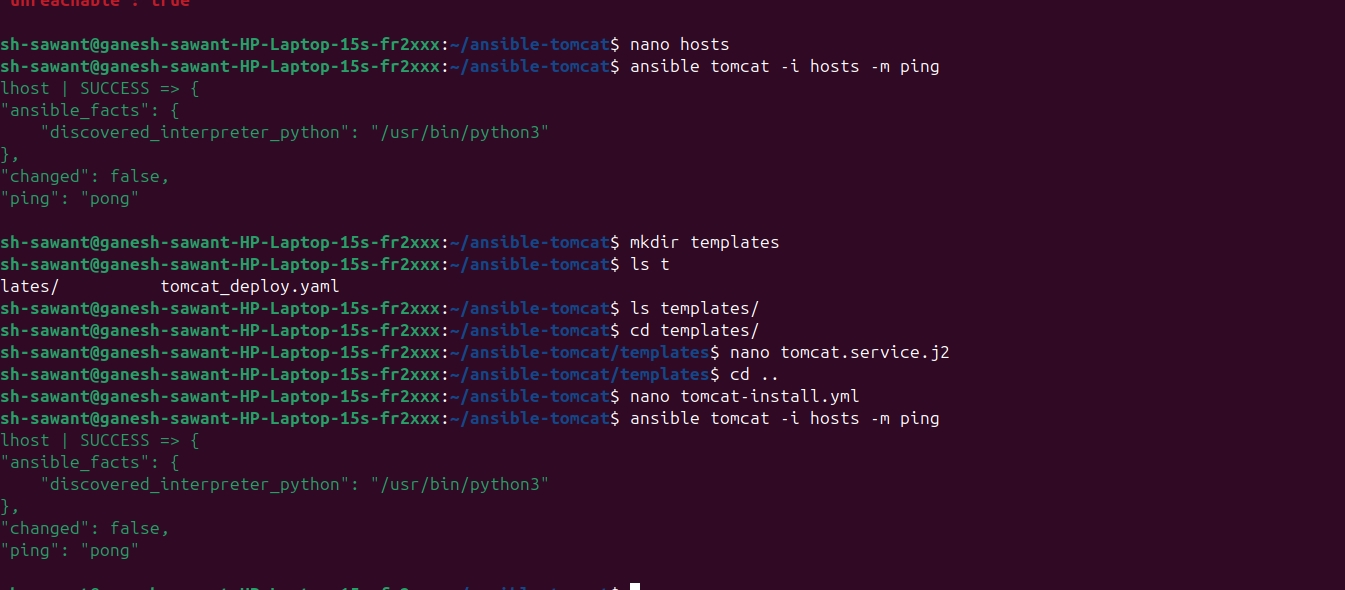
Step 4: Verify Ansible Connectivity
ansible tomcat -i hosts -m ping
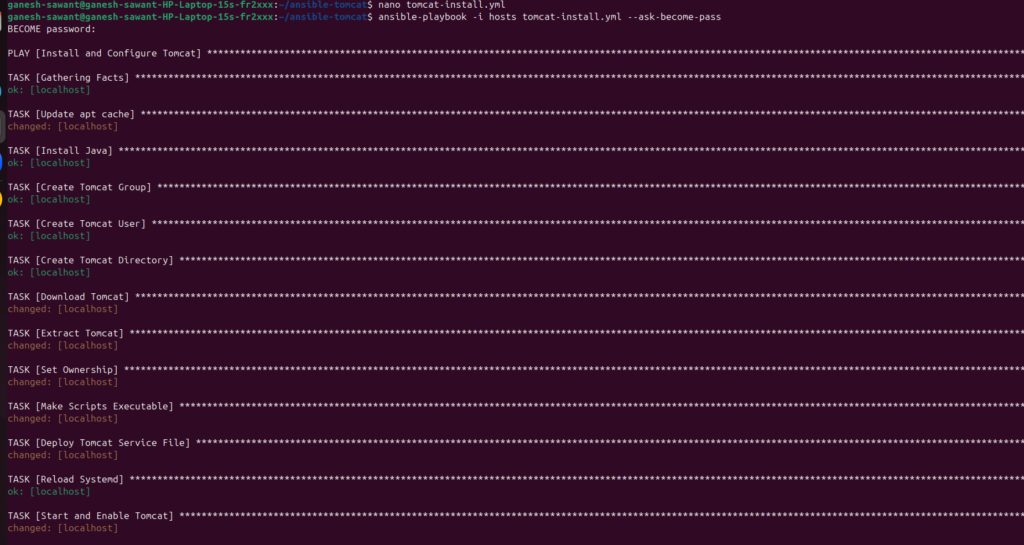
Step 5: Run Playbook
ansible-playbook -i hosts tomcat-install.yml
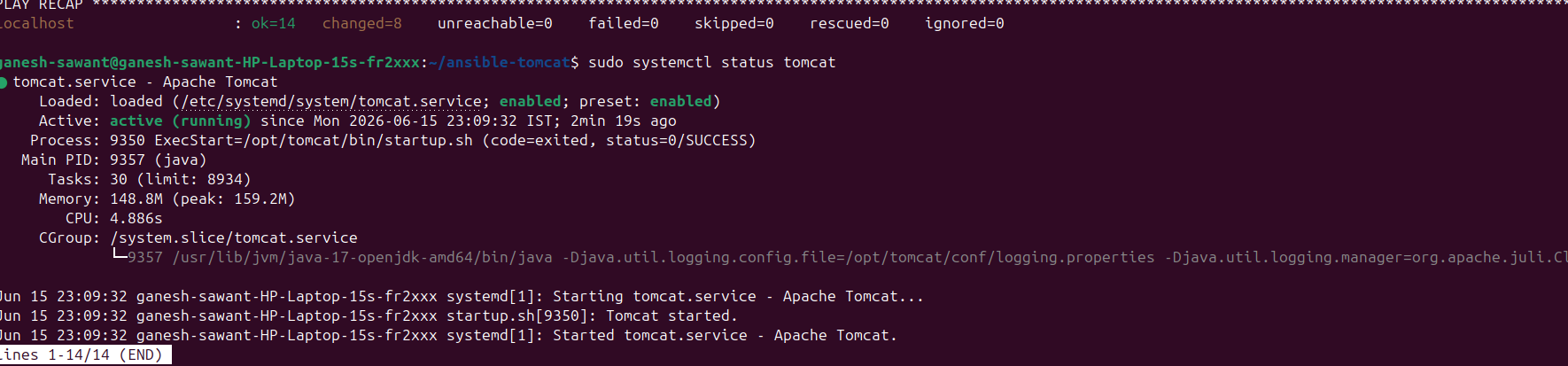
Step 6: Verify Tomcat Service
sudo systemctl status tomcat
Step 7: Verify Port
sudo ss -tulpn | grep 8082
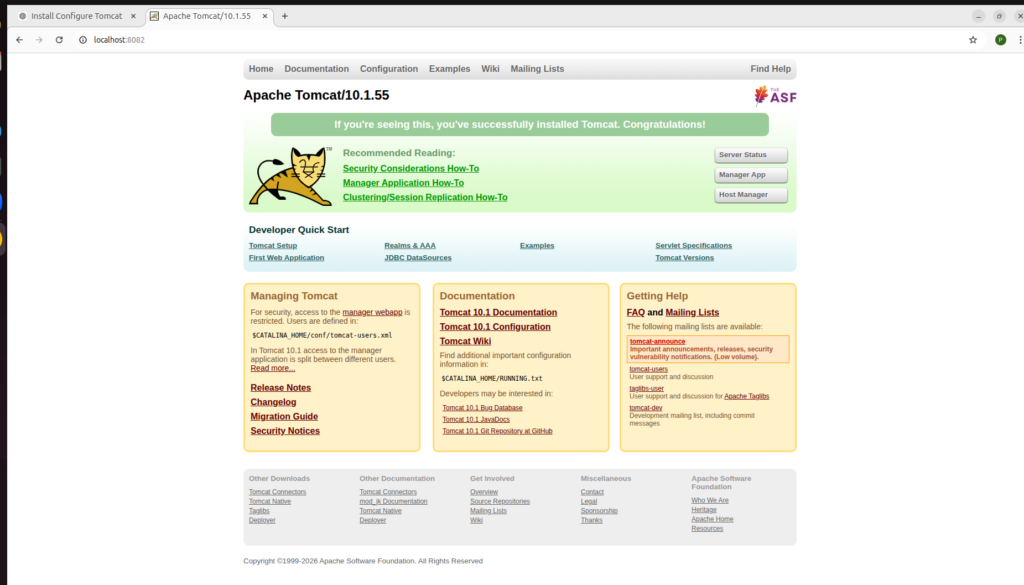
Step 8: Access Tomcat
http://localhost:8082
Benefits of Install Apache Tomcat using Ansible:
There are several advantages when you Install Apache Tomcat using Ansible:
- Automated deployment
- Faster server provisioning
- Consistent configuration
- Reduced manual errors
- Infrastructure as Code (IaC)
- Easy scalability
Using Ansible makes it simple to manage multiple servers from a single control node.
Why Install Apache Tomcat using Ansible?
Ansible provides a simple and agentless approach for managing infrastructure. When you Install Apache Tomcat using Ansible, you can automate repetitive tasks, maintain configuration consistency, and deploy applications faster. The same playbook can be reused across development, testing, and production environments. This reduces human errors and improves operational efficiency. Ansible also makes it easy to scale deployments across multiple servers from a single control node.
previous blog link Deploy Apache Tomcat Using Ansible
Conclusion:
In this tutorial, we learned how to Install Apache Tomcat using Ansible using an automated approach. By creating an inventory file, service template, and playbook, you can deploy Tomcat quickly and consistently across multiple Ubuntu servers. Organizations that Install Apache Tomcat using Ansible benefit from faster deployments, improved reliability, and reduced operational effort. Automation is a key DevOps practice, and Ansible provides an efficient way to manage Tomcat environments at scale.
Useful Resources:
For more information about Apache Tomcat, visit the official Apache Tomcat Documentation.
To learn more about Ansible automation, refer to the official Ansible Documentation.
Apache Tomcat Documentation → https://tomcat.apache.org/
Ansible Documentation → https://docs.ansible.com/

- How to Create a Server on AWS – Step-by-Step Guide for Beginners - September 2, 2026
- Helm GitOps Integration: A Complete Step-by-Step Guide for Beginners - August 6, 2026
- DevOps Engineer vs Platform Engineer vs Site Reliability Engineer (SRE) - August 4, 2026