

Learn GitHub Actions with this beginner-friendly guide. Understand CI/CD, workflows, jobs, runners, and build your first automation workflow step-by-step.
In modern software development, automation plays a major role in delivering applications faster and with fewer errors. Developers and DevOps engineers use automation tools to build, test, and deploy applications automatically. One of the most popular CI/CD platforms available today is GitHub automation.
If you are a beginner in DevOps or CI/CD, This guide will help you understand this automation tool from scratch.
Introduction to CI/CD
Before learning GitHub Actions, it is important to understand CI/CD.
CI/CD stands for:
- CI → Continuous Integration
- CD → Continuous Delivery/Deployment
CI/CD is a modern software development practice where developers frequently push code changes to a repository, and automated pipelines handle testing, building, and deployment.
Continuous Integration (CI)
Continuous Integration means developers regularly merge code into a shared repository. Whenever code is pushed, automated processes run tests and verify the application.
Benefits of CI
- Detect bugs early
- Improve code quality
- Faster development
- Reduce manual work
- Better collaboration among developers
Continuous Delivery (CD)
Continuous Delivery automates the release process after testing. Applications become ready for deployment at any time.
Benefits of CD
- Faster software delivery
- Reliable deployments
- Reduced downtime
- Improved customer experience
Why Automation is Important
Imagine manually testing and deploying applications every day. It would:
- Take a lot of time
- Increase human errors
- Slow down software delivery
- Create deployment issues
Automation solves these problems by performing repetitive tasks automatically.
Examples of Automation
- Running tests automatically
- Building applications
- Deploying applications
- Sending notifications
- Security scanning
- Docker image creation
Automation helps companies release software quickly and reliably.
What is GitHub Actions?
GitHub Actions Official Website
This CI/CD platform is provided directly by GitHub for workflow automation.. It allows developers to automate workflows directly inside GitHub repositories.
With GitHub Actions, you can:
- Build applications
- Run automated tests
- Deploy applications
- Create Docker images
- Automate DevOps tasks
- Send alerts and notifications
GitHub Actions uses YAML files to define workflows.
These workflow files are stored inside:
.github/workflows/
Benefits of GitHub Actions
This workflow automation system became popular because it is easy to use and fully integrated with GitHub repositories.
1. Easy Integration with GitHub
No separate server setup is required because GitHub Actions works directly inside GitHub repositories.
2. Free for Public Repositories
GitHub provides free usage for public repositories and limited free usage for private repositories.
3. Supports Multiple Platforms
This CI/CD platform supports:
- Linux
- Windows
- macOS
4. Large Marketplace
GitHub provides thousands of reusable actions through the GitHub Marketplace.
Examples:
- Docker actions
- Kubernetes actions
- AWS deployment actions
- Java build actions
- Node.js actions
5. Easy YAML Syntax
Workflows are written in simple YAML format, making automation easy even for beginners.
6. Scalable Automation
This CI/CD platform supports:
- Parallel jobs
- Matrix builds
- Multiple environments
- Complex CI/CD pipelines
Real-World Use Cases of GitHub Actions
Many companies use this automation tool for software delivery automation.
Common Use Cases
1. Automatic Testing
Whenever developers push code, tests run automatically.
Example:
- Java Maven testing
- Node.js testing
- Python unit testing
2. Docker Image Build
This workflow automation system can automatically:
- Build Docker images
- Push images to Docker Hub or ACR
3. Deployment Automation
Applications can be deployed automatically to:
- AWS
- Azure
- Kubernetes
- VPS servers
4. Security Scanning
This CI/CD tool can scan code for:
- Vulnerabilities
- Secrets
- Dependency issues
5. Notification Automation
Actions can send notifications to:
- Slack
- Discord
- Microsoft Teams
GitHub Actions Workflow Architecture
To understand GitHub Actions properly, you must know its architecture.
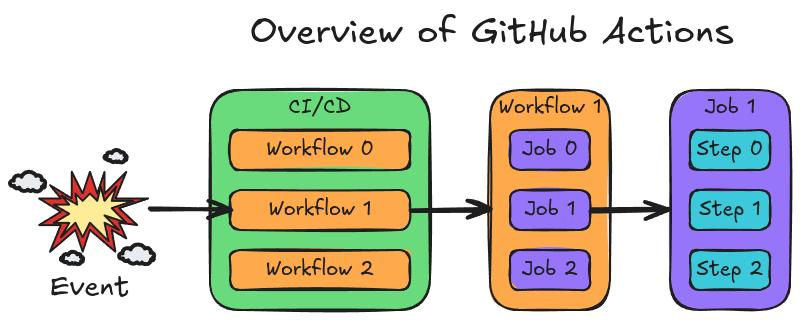
A workflow contains:
- Workflow
- Job
- Step
- Action
- Runner
Let us understand each component.
1. Workflow
A workflow is an automation process defined in a YAML file.
It contains:
- Triggers
- Jobs
- Steps
Workflows are stored inside:
.github/workflows/Example:
name: First Workflow2. Job
A workflow contains one or more jobs.
Each job runs independently on a runner.
Example:
jobs:
  demo-job:
Here:
demo-jobis the job name.
3. Step
Each job contains multiple steps.
A step can:
- Run commands
- Execute scripts
- Use reusable actions
Example:
steps:
  - name: Print Message
    run: echo "Hello GitHub Actions"
4. Action
Actions are reusable automation components.
GitHub Marketplace provides thousands of ready-made actions.
Examples:
- Checkout code
- Setup Java
- Build Docker images
5. Runner
A runner is the machine that executes workflows.
GitHub provides hosted runners:
- Ubuntu
- Windows
- macOS
Example:
runs-on: ubuntu-latestThis means the workflow runs on the latest Ubuntu server.
GitHub Actions Workflow Syntax
How GitHub Actions Works
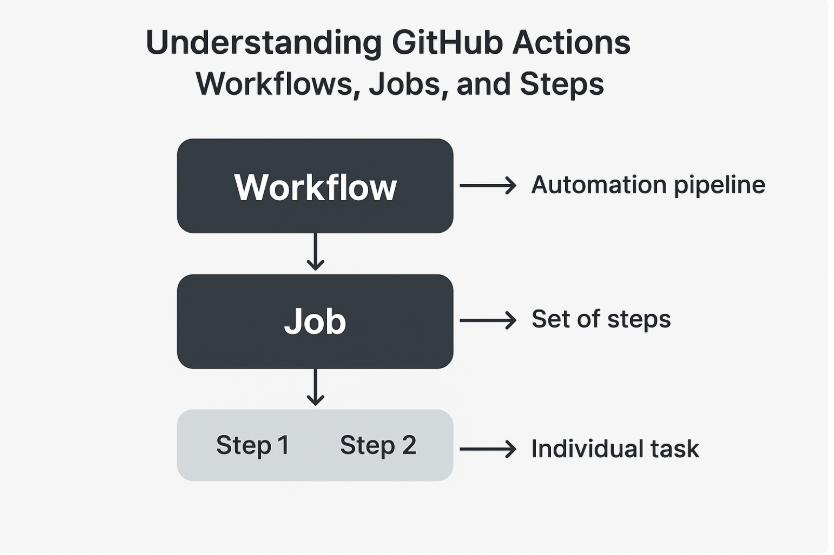
The workflow process is simple.
Workflow Execution Flow
- Developer pushes code
- GitHub detects the event
- Workflow starts automatically
- Jobs execute on runners
- Steps run one by one
- Results are displayed in GitHub Actions tab
Practical Example — Your First GitHub Actions Workflow
Now let us create a simple workflow.
This workflow prints:
Hello GitHub ActionsStep 1 — Create a GitHub Repository
Create a repository on GitHub.
Example:
github-actions-demo
Step 2 — Create Workflow Folder
Inside your project create:
.github/workflowsStep 3 — Create YAML File
Create a file:
first-workflow.ymlPath:
.github/workflows/first-workflow.ymlStep 4 — Add Workflow Code
Add the following code:
name: First Workflow

on: push

jobs:
  demo-job:
    runs-on: ubuntu-latest

    steps:
      - name: Print Message
        run: echo "Hello GitHub Actions"
Understanding the Workflow Code
Let us understand this workflow line by line.
Workflow Name
name: First WorkflowThis defines the workflow name displayed in GitHub Actions dashboard.
Trigger Event
on: pushThis workflow starts whenever code is pushed to the repository.
Jobs Section
jobs:Defines all jobs in the workflow.
Job Name
demo-job:Defines a job called demo-job.
Runner
runs-on: ubuntu-latestSpecifies the operating system for workflow execution.
Steps
steps:Contains all commands executed inside the job.
Run Command
run: echo "Hello GitHub Actions"Prints a message in the workflow logs.
Step 5 — Commit and Push Code
Run these commands:
git add .
git commit -m "Added first workflow"
git push origin main
Step 6 — View Workflow Execution
Go to your repository.
Click:
- Actions Tab
You will see:
- Workflow execution status
- Logs
- Success or failure results
Expected Output
You will see:
Hello GitHub Actionsinside the workflow logs.
Advantages of Learning GitHub Actions
Learning GitHub Actions helps you:
- Start DevOps career
- Build CI/CD pipelines
- Automate deployments
- Improve development workflow
- Work with cloud and containers
- Prepare for DevOps interviews
Common Beginner Mistakes
1. Incorrect YAML Indentation
YAML is indentation-sensitive.
Always use proper spacing.
2. Wrong Workflow Path
Workflow files must be inside:
.github/workflows/3. Syntax Errors
Even a small YAML mistake can fail workflows.
Best Practices
- Keep workflows simple initially
- Use meaningful job names
- Test workflows regularly
- Store secrets securely
- Use reusable actions
Conclusion
GitHub Actions is one of the most powerful and beginner-friendly CI/CD automation tools available today. It helps developers automate building, testing, and deployment processes directly from GitHub repositories.
In this guide, you learned:
- What CI/CD is
- Importance of automation
- What GitHub Actions is
- Workflow architecture
- Important terms like workflow, jobs, steps, actions, and runners
- How to create your first workflow
GitHub Actions is an essential skill for DevOps engineers, cloud engineers, and modern developers. Start practicing simple workflows today and gradually move toward advanced CI/CD pipelines.
Frequently Asked Questions (FAQs)
Is GitHub Actions free?
Yes, GitHub Actions provides free usage for public repositories and limited free minutes for private repositories.
Which languages are supported?
GitHub Actions supports all major languages including:
- Java
- Python
- Node.js
- Go
- PHP
- .NET
Can GitHub Actions deploy applications?
Yes, it can deploy applications to:
- AWS
- Azure
- Kubernetes
- Docker
- VPS servers
Is GitHub Actions good for beginners?
Yes, GitHub Actions is one of the easiest CI/CD tools for beginners because it integrates directly with GitHub.

- Trivy Docker Vulnerability Scanning – Complete Guide - October 14, 2026
- How to Create a Server on AWS – Step-by-Step Guide for Beginners - September 2, 2026
- Helm GitOps Integration: A Complete Step-by-Step Guide for Beginners - August 6, 2026