MCP vs AI Agent is an important topic in artificial intelligence and automation. MCP (Model Context Protocol) connects AI applications with external tools and data sources, while AI Agents use reasoning, planning, and available tools to accomplish specific goals. Understanding MCP vs AI Agent helps developers and DevOps engineers build smarter automation workflows.
1. Introduction
- Introduction to Artificial Intelligence (AI) and AI-powered automation.
- What are MCP and AI Agents?
- Why are MCP and AI Agents becoming important in modern software development?
- How MCP and AI Agents work together.
- Overview of the blog.
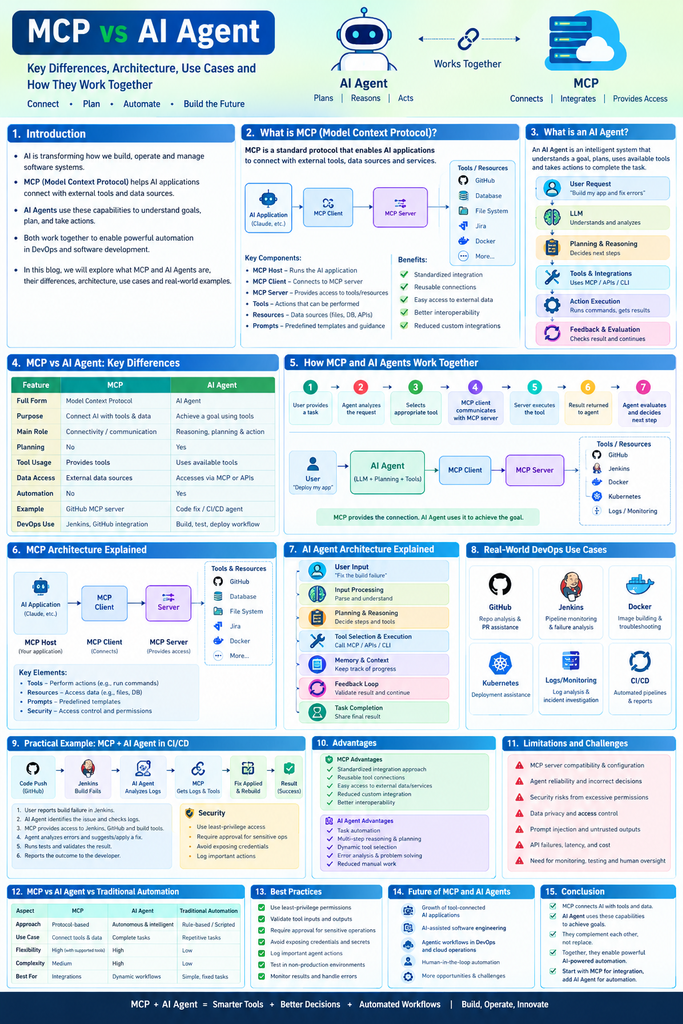
2. What Is MCP (Model Context Protocol)?
- Definition and purpose of MCP.
- Why MCP was introduced.
- How MCP connects AI applications to external tools and data sources.
- Key components of MCP:
- MCP Host
- MCP Client
- MCP Server
- Tools
- Resources
- Prompts
- Benefits of using MCP.
- Examples of MCP integrations with GitHub, databases, file systems, and development tools.
3. What Is an AI Agent?
- Definition of an AI Agent.
- How AI Agents understand and execute user instructions.
- Key components of an AI Agent:
- Large Language Model (LLM)
- Planning and reasoning
- Memory and context
- Tools and integrations
- Action execution
- Feedback and evaluation
- How AI Agents make decisions and complete tasks.
- Examples of AI Agents in software development and DevOps.
4. MCP vs AI Agent: Key Differences
- Purpose and functionality.
- Architecture and working principles.
- Planning and decision-making capabilities.
- Tool integration and execution.
- Data access and communication.
- Automation capabilities.
- Security and permissions.
- Use cases and practical applications.
5. How MCP and AI Agents Work Together
- Understanding the relationship between MCP and AI Agents.
- How an AI Agent discovers and uses MCP-provided tools.
- Step-by-step workflow:
- The user provides a task.
- The AI Agent analyzes the request.
- The agent selects an appropriate tool.
- The MCP client communicates with an MCP server.
- The MCP server executes the requested tool.
- The result is returned to the agent.
- The agent evaluates the result and decides the next step.
- Real-world example of AI-powered development automation.
Architecture:
6. MCP Architecture Explained
MCP uses a host-client-server architecture to standardize communication between AI applications and external capabilities.
Architecture Components
MCP Host: Runs the AI application and coordinates interactions.
MCP Client: Establishes and manages communication with an MCP server.
MCP Server: Makes supported tools, resources, and prompts available.
External systems: Provide the actual functionality or information, such as repository data, database records, or file operations.
- MCP Host, Client, and Server architecture.
- Communication between AI applications and MCP servers.
- Tools, Resources, and Prompts explained.
- How MCP standardizes integrations.
- A practical architecture diagram.
- MCP security considerations and access controls.
MCP Capabilities
- Tools for performing operations.
- Resources for exposing relevant information.
- Prompts for reusable interaction templates.
MCP can use different supported transports, including standard input/output for local servers and Streamable HTTP for remote communication.
7. AI Agent Architecture Explained
An AI Agent architecture describes how an agent receives a task, reasons about it, interacts with tools, and evaluates the outcome.
Typical Execution Flow
Input → Understanding → Planning → Tool Selection → Action → Evaluation → Final Result
For example, an agent investigating an application failure may:
- Receive a build failure report.
- Read relevant logs.
- Identify likely causes.
- Retrieve additional information using available tools.
- Suggest or apply a fix.
- Execute tests if authorized.
- Report the results.
Not every agent uses the same architecture. Some use simple, predefined workflows, while others support more dynamic planning and repeated tool use.
- Input processing and task understanding.
- Reasoning and planning.
- Tool selection and execution.
- Context and memory management.
- Feedback loops and task completion.
- Human approval and error handling.
Use Cases:
8. Real-World DevOps Use Cases
MCP and AI Agents can support several software development and DevOps activities.
GitHub Integration
An AI application can use a suitable GitHub integration to retrieve repository information, inspect pull requests, and work with issues.
An AI Agent can use that information to summarize code changes, help investigate bugs, or prepare a pull request review.
Jenkins Pipeline Monitoring
A compatible integration can provide access to build status and logs.
An agent can analyze failed builds, identify potential causes, and suggest corrective actions.
Docker Automation
An agent with authorized access to Docker tools can help build images, inspect build failures, review image configuration, and troubleshoot containers.
Kubernetes Operations
Agents can assist with investigating pod failures, examining deployment status, reviewing events, and suggesting configuration changes.
Production changes should be protected by appropriate approvals and access controls.
Monitoring and Incident Analysis
Agents can analyze available Prometheus metrics, Grafana alerts, application logs, and incident reports to help identify possible causes of service disruptions.
CI/CD Documentation
AI systems can summarize pipeline results, prepare release notes, document deployment procedures, and generate incident reports.
Example:
9. Practical Example: MCP and AI Agent in CI/CD
- Scenario: A Java application build fails in Jenkins.
- How the AI Agent identifies the task.
- How MCP can provide access to supported tools and information.
- Retrieving build logs and analyzing errors.
- Suggesting or applying a fix.
- Running tests and validating the result.
- Reporting the outcome to the developer.
- Security controls required before executing changes or deployments.
10. Advantages of MCP
- Standardized integration approach.
- Reusable tool connections.
- Easier access to external data and services.
- Reduced need for custom integrations in supported environments.
- Improved interoperability between AI applications and tools.
11. Advantages of AI Agents
- Task automation.
- Multi-step reasoning and planning.
- Dynamic tool selection.
- Error analysis and problem-solving assistance.
- Reduced repetitive manual work.
- Support for complex workflows.
12. Limitations and Challenges
MCP Challenges
- Server setup and configuration.
- Differences in available tools and capabilities.
- Authentication and permission management.
- Network failures and integration compatibility.
- Risks from untrusted tool descriptions or results.
- AI Agent Challenges
- Incorrect reasoning or conclusions.
- Unexpected tool selection.
- Unreliable execution of complex workflows.
- Increased latency and model usage costs.
- Difficulty evaluating whether a task is genuinely complete.
- Potential for harmful actions when permissions are excessive.
13. MCP vs AI Agent vs Traditional Automation
- Differences between protocol-based integration and autonomous task execution.
- Comparison with traditional scripts and rule-based automation.
- When to use MCP.
- When to use an AI Agent.
- When traditional automation is the better choice.
- How all three approaches can work together.
Traditional automation, MCP, and AI Agents solve different problems.
| Aspect | MCP | AI Agent | Traditional Automation |
|---|---|---|---|
| Approach | Standardized integration | Goal-oriented reasoning and actions | Predefined rules and scripts |
| Main purpose | Connect applications to capabilities | Coordinate tasks | Execute predictable procedures |
| Flexibility | Depends on supported integrations | Can adapt within its design and permissions | Usually follows explicit rules |
| Best suited for | Tool and data connectivity | Complex or variable workflows | Repeatable, deterministic tasks |
| Example | MCP server exposing repository tools | Agent investigating a failed pipeline | Jenkins pipeline running Maven tests |
14. Best Practices
- Follow least privilege: Give each integration only the permissions it needs.
- Validate inputs: Check tool arguments before executing operations.
- Protect secrets: Use secure credential management rather than embedding secrets in prompts or source code.
- Require approval: Gate destructive operations and production deployments.
- Validate outputs: Check tool results before using them in subsequent steps.
- Maintain audit logs: Record significant actions and decisions.
- Test safely: Validate workflows in development or staging environments.
- Handle failures: Implement timeouts, retries where appropriate, and clear error reporting.
- Monitor usage: Track costs, latency, tool failures, and task success rates.
- Maintain human oversight: Ensure that important decisions can be reviewed by responsible people.
15. Future of MCP and AI Agents
AI applications are increasingly being designed to interact with software tools, business systems, and development environments.
MCP can simplify how compatible AI applications discover and access supported capabilities. AI Agents can use those capabilities to coordinate more complex workflows.
Potential developments include:
- AI-assisted software development.
- Intelligent DevOps troubleshooting.
- Tool-connected enterprise assistants.
- Automated documentation and reporting.
- Human-supervised infrastructure operations.
- Multi-agent systems that coordinate specialized tasks.
- Growth of tool-connected AI applications.
- AI-assisted software engineering.
- Agentic workflows in DevOps and cloud operations.
- Human-in-the-loop automation.
- Opportunities and challenges for organizations.
However, successful adoption will depend on security, reliability, evaluation, and clear boundaries on what AI systems are allowed to do.
16. Conclusion
- Summarize the differences between MCP and AI Agents.
- Explain why they complement each other.
- Highlight their role in AI-powered automation.
- Provide recommendations for developers and DevOps engineers.
17. Frequently Asked Questions (FAQs)
- What is MCP in AI?
- What is an AI Agent?
- Is MCP an AI Agent?
- Can an AI Agent work without MCP?
- Does MCP make AI autonomous?
- What is the difference between MCP and API?
- How is MCP used in DevOps?
- What are the best examples of MCP and AI Agents?
- Is MCP required for Claude Code?
- What are the security risks of MCP and AI Agents?
SEO Elements
- Focus Keyword: MCP vs AI Agent
- Secondary Keywords: Model Context Protocol, AI Agent Architecture, MCP Server, AI Automation, Agentic AI, MCP in DevOps
- Suggested URL Slug:
mcp-vs-ai-agent - Suggested Meta Description: Learn the difference between MCP and AI Agents, understand their architecture, explore real-world DevOps use cases, and discover how they work together to automate workflows.

- MCP vs AI Agent: Key Differences, Architecture, Use Cases, and Examples - November 2, 2026
- Trivy Docker Vulnerability Scanning – Complete Guide - October 14, 2026
- How to Create a Server on AWS – Step-by-Step Guide for Beginners - September 2, 2026